Clients send their documents on time. Nobody has to chase them.
CA ClientOps opens each client's checklist when a period ends, reminds them on WhatsApp and email in English, Hindi or Marathi, and takes the files from a link on their phone. Your team reviews. A partner approves.
14 days free with your own clients. No payment details to start.
नमस्कार Rahul, Joshi Rao & Associates यांना Shree Sai Packaging साठी ही कागदपत्रे हवी आहेत: GST ऑक्टोबर 2026: विक्री रजिस्टर, खरेदी रजिस्टर, सर्व खात्यांचे बँक स्टेटमेंट, क्रेडिट आणि डेबिट नोट. कृपया 4 नोव्हेंबर पर्यंत अपलोड करा.
कागदपत्रे अपलोड करा: https://caclientops.dinerotechnologies.in/p/…
रिमाइंडर बंद करण्यासाठी STOP पाठवा.
GST for October 2026
Worked out by the app from the GST calendar, Maharashtra holidays and the reminder rules every new firm starts with.
- Mon 2 NovChecklist goes outWith the upload link, in the client's language.
- Tue 3 NovLast-day reminderThe day before your cut-off.
- Thu 5 NovOverdue reminderLists only what is still missing.
- Fri 6 NovOverdue reminderLists only what is still missing.
- Mon 9 NovA person callsReminders stop. The client moves to your list to call.
The cut-off passes. The purchase register arrives the day before GSTR-1.
- Someone on the team messages every client, one by one, from their own phone.
- Files come back as photos, PDFs and forwards across WhatsApp chats and inboxes, and someone sorts them into clients and months.
- Last month's bank statement turns up as this month's, and nobody notices until the return is being prepared.
- The partner asks who is still pending, and the answer means scrolling through chats.
- When a person leaves, their follow-ups leave with them.
How a month runs
The checklist opens when the period ends
The day after the period ends, each client gets its checklist: sales register, purchase register, bank statements, or whatever you ask them for. Your cut-off sits a few working days before the return date.
Reminders go in the client's language
WhatsApp in English, Hindi or Marathi, email in English. One message a day at most, never on Sunday, never at night, and each reminder lists only what is still missing.
The client uploads from the link
One button per document, on the phone. Each file is checked as it arrives: the type, a renamed file, the same file twice, a file name that says another month.
Your team reviews
When everything required is in, the checklist moves to ready for review. The team member opens each file, and sends back anything wrong with a reason the client understands.
A partner approves
A partner or manager approves the review and the checklist is complete. Clients who still have not sent anything after the cut-off come to you as a list to call.
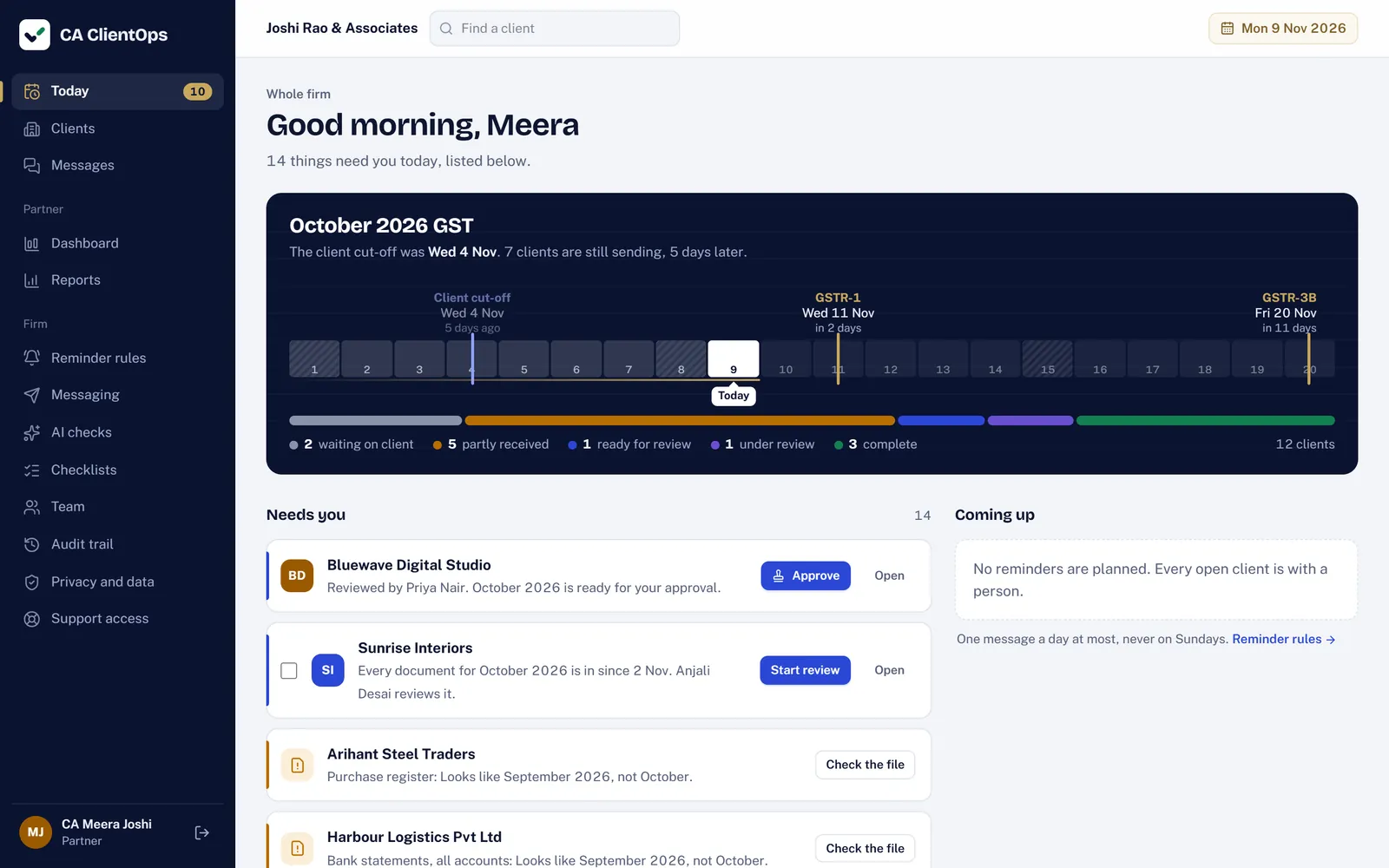
One page for the morning
Today shows the period as a track from opening day to the return dates, with today marked and every client counted by where they stand. Under it, only what needs a person: reviews to approve, files flagged by the checks, clients to call.
What your client sees
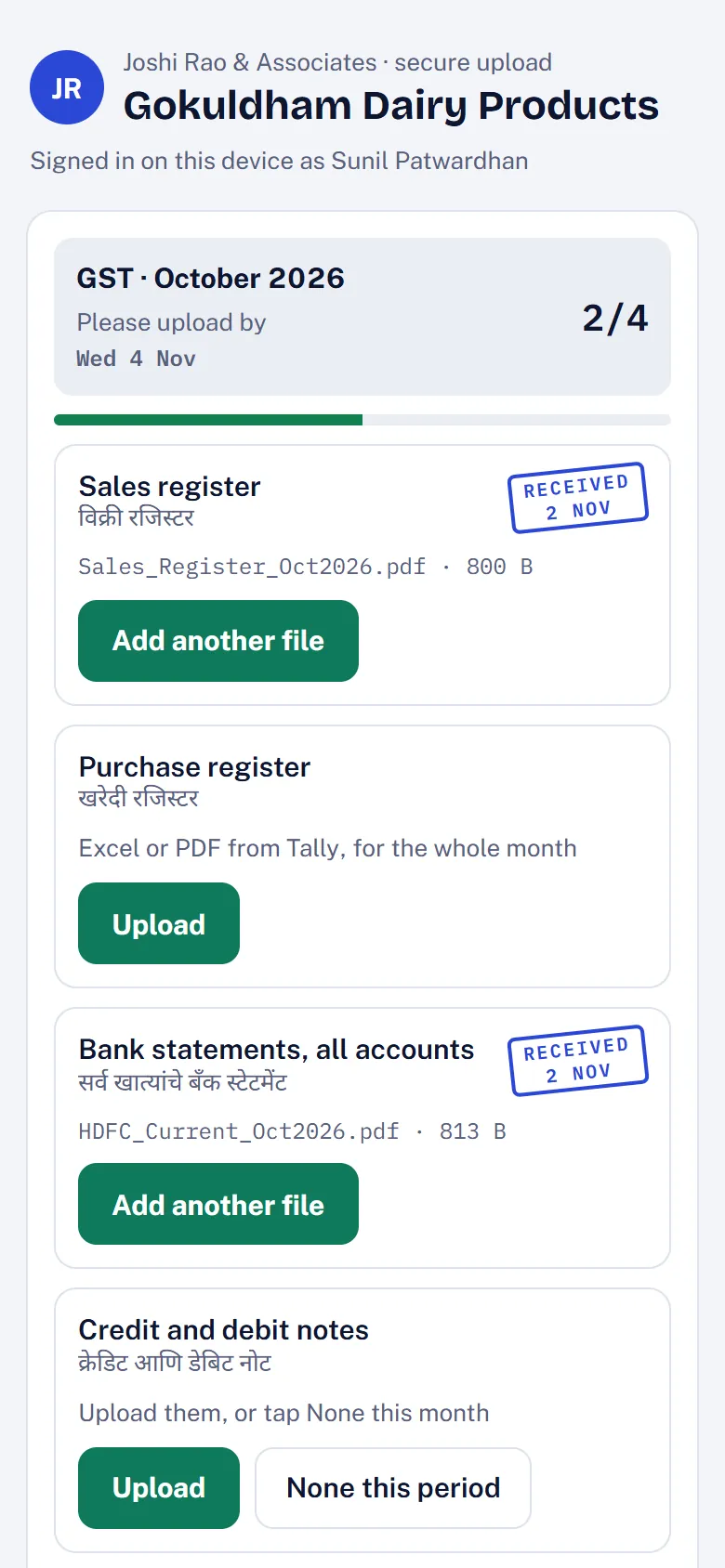
A page under your firm's name, made for the phone in their hand.
- Nothing to install. The link opens in the browser. No account and no password.
- One button per document. Each item says what you need and why, with its name in Hindi or Marathi for clients who read those.
- None this period. For items you mark that way, a client with no credit notes this month says so in one tap.
- A receipt for every file. They know it reached you, and what is still pending.
- Their consent, recorded. A short privacy notice comes first. Earlier files open only after a one-time code.
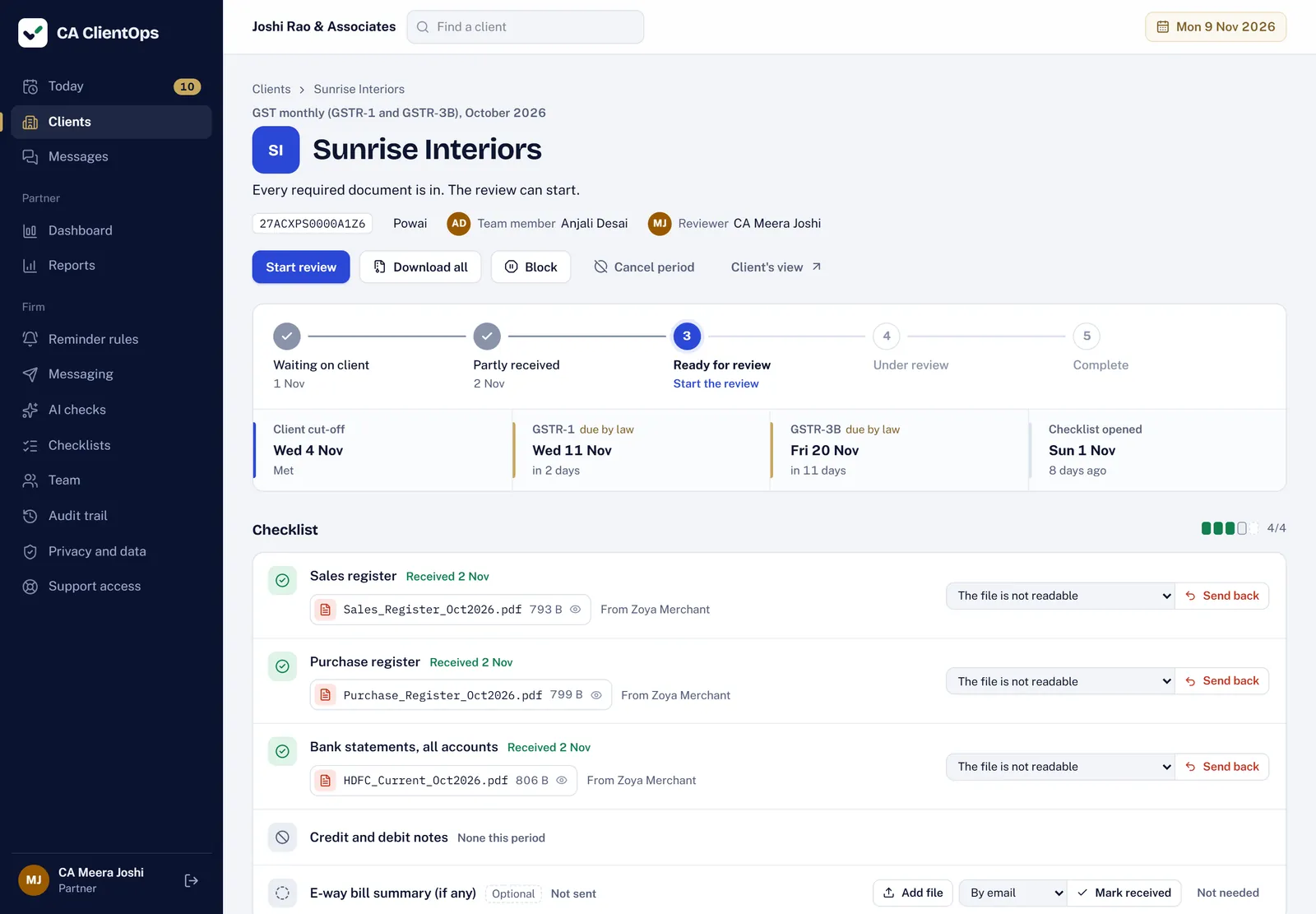
Review in one place, approve with one click
Every file for the client and period, with who sent it and when. The cut-off and the statutory dates stay in view. Send back a file with a reason, upload one on the client's behalf, or block the checklist while you wait on a query.
Everything a filing season needs
- Collection calendar
- GST monthly and QRMP, TDS, advance tax, ITR, tax audit, ROC, LLP, PF and ESI. Statutory dates kept apart from your cut-off, and moved when a due date is extended.
- Checklists you set
- Per service, required or optional, with hints for the client. Skip or add items for one client.
- Reminder rules
- Choose when each reminder goes, the escalation day and the quiet day.
- Checks on every file
- Type, size, renamed files, duplicates and the wrong month, before anyone opens it.
- Dashboard and reports
- Clients by team member, turnaround per client, late clients, and a morning email.
- Audit trail and export
- Every change recorded. Your whole firm, files included, in one download.
- Team and roles
- Partners, managers and staff. Partners sign in with two-factor.
- AI checks, if you want them
- Off unless a partner turns them on. They suggest; a person confirms.
Your clients' papers, kept like they matter
- Each firm kept apart by the database. Row-level security in Postgres means one firm's queries cannot read another's rows.
- Database in Mumbai. Files in Cloudflare R2, Asia-Pacific. Everything over HTTPS.
- Two-factor sign-in for partners. Every device session can be seen and ended.
- Your data stays yours. Export everything at any time. Files are deleted eight years after they arrive.
Priced by the clients you collect from
Every plan has every feature. Prices are a month, before 18% GST; paying yearly gives two months free.
- Starter₹2,999Up to 100 active clients and 5 people
- Growth₹5,999Up to 300 active clients and 15 peopleThe trial runs on this plan
- Scale₹9,999Up to 1,000 active clients and 25 people
Questions partners ask
More in Help, or write to us from the contact page.
Do my clients need an app or a password?
No. They open the link in your message and upload from the phone's browser. A link works for 14 days, and the phone stays signed in for 30 days, so the next month's link opens straight away.
Which WhatsApp number do the messages come from?
Your firm's own. The app writes each message in the client's language with the upload link, and a person on your team taps Send on WhatsApp from the Today page; WhatsApp opens with the text ready. Clients see your number and reply to you as they do now. Email goes out by itself.
What if a client sends last month's statement?
When a file name says a different month, the file is kept and flagged for your team, not refused. Someone looks at it and either accepts it or sends it back with a reason, and the client is asked again. The same file sent twice is not stored twice.
Which returns does it cover?
GST monthly and QRMP, TDS returns and challans, advance tax, ITR for individuals, businesses and audit cases, tax audit, ROC and LLP annual filings, PF and ESI. Each has its own checklist you can change, and its statutory dates come from the calendar.
Does it file returns or connect to the GST portal?
No. CA ClientOps gets the documents in, checked and reviewed. Your team prepares and files returns the way it does today. A partner can download a period's files as a zip, in folders by client and document.
Where is our data kept?
The database is in Mumbai. Files are stored in Cloudflare R2 in an Asia-Pacific location, which may be outside India. Each firm's data is kept apart by the database itself.
What happens when the trial ends?
If you chose a plan, the first payment is taken then. If not, the firm turns read-only: everyone can still sign in and download everything, but nothing new goes out. Nothing is deleted.
Try it on next month's GST.
14 days free on the Growth plan's limits. A guided setup brings in your team, clients and checklists, and nothing goes to a client until you switch reminders on.